How Claude Code memory actually works
You close your laptop on Friday after a long debugging session with Claude Code. On Monday you open it back up, start a new conversation, and Claude already knows your build command, remembers you prefer pnpm, and knows the API tests need a local Redis instance. You never wrote any of that down. How?
Claude Code starts every session with a blank context window. It doesn't carry over conversation history. Everything it "knows" has to be loaded from files on disk before the first turn. Two systems handle this: CLAUDE.md files that you write, and an auto memory system that Claude writes to itself. Behind auto memory, three background processes operate at different timescales to extract, maintain, and consolidate what Claude learns.
This post is based on reading the Claude Code source code. Not the docs. The actual TypeScript.
CLAUDE.md: the files you write
CLAUDE.md is a plain markdown file that gives Claude persistent instructions. You can put one at several locations, each with a different scope:
| Scope | Location | Shared with |
|---|---|---|
| Managed policy | Platform-specific (see below) | All users on machine |
| User | ~/.claude/CLAUDE.md |
Just you (all projects) |
| Project | ./CLAUDE.md or ./.claude/CLAUDE.md |
Team (via git) |
| Local | ./CLAUDE.local.md |
Just you (this project, not committed) |
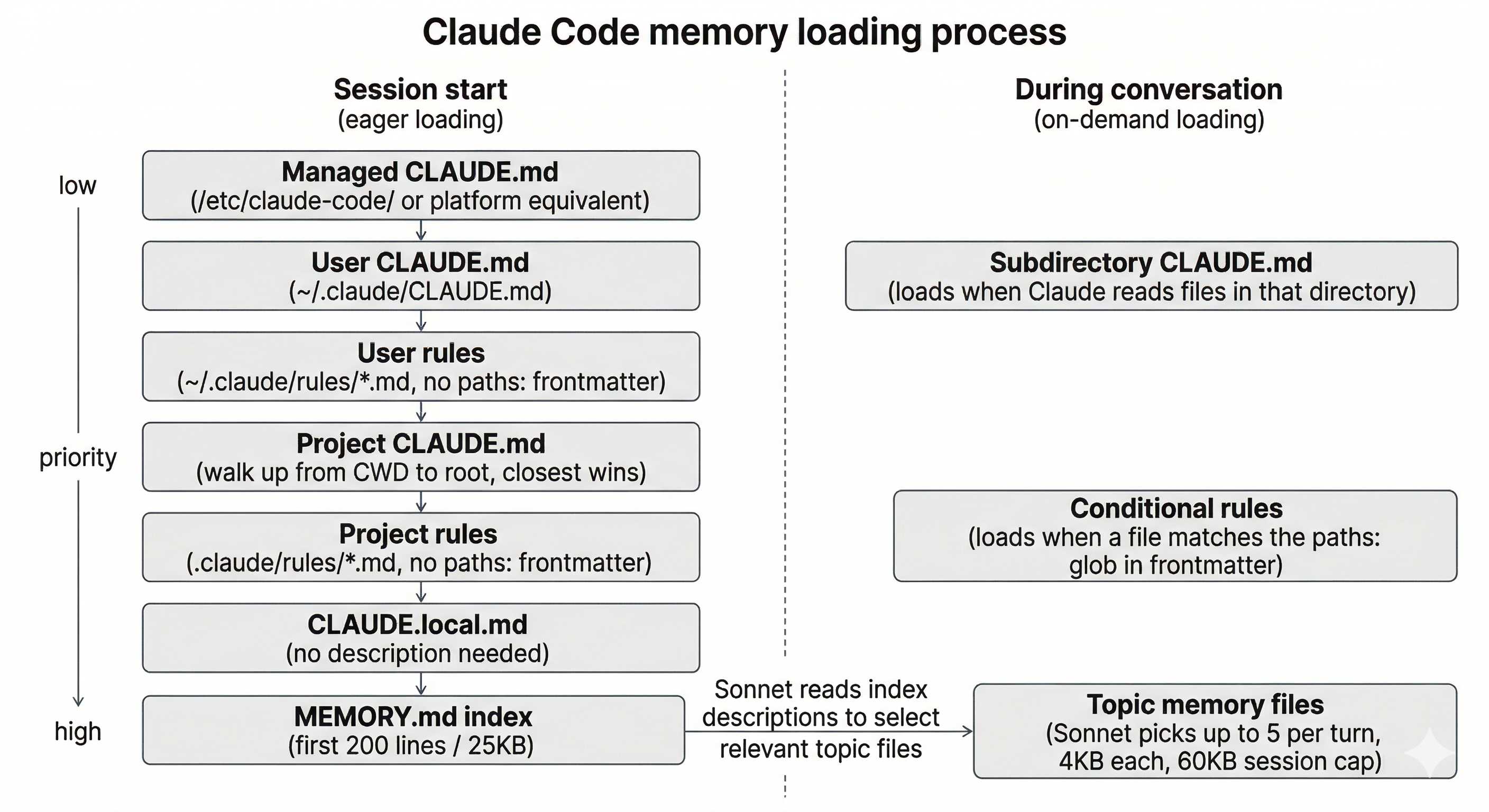
Claude Code walks up the directory tree from your working directory, loading every CLAUDE.md it finds. If you run Claude in foo/bar/, it loads both foo/bar/CLAUDE.md and foo/CLAUDE.md. Files closer to your working directory take priority over files closer to the root. CLAUDE.md files in subdirectories below your working directory load on demand when Claude reads files in those subdirectories.
The managed policy path depends on your OS:
macOS:   /Library/Application Support/ClaudeCode/CLAUDE.md
Linux:   /etc/claude-code/CLAUDE.md
Windows: C:\Program Files\ClaudeCode\CLAUDE.md
Managed files always load. They can't be excluded by settings.
CLAUDE.local.md
This one isn't in the official docs but exists in the source. It's a project-specific instruction file that isn't committed to git. Useful for personal overrides on a shared project, like pointing to a local database or enabling debug flags. It loads after project CLAUDE.md files and before auto memory.
Size limits
There's no hard cutoff that prevents a CLAUDE.md from loading. But the source defines MAX_MEMORY_CHARACTER_COUNT = 40000 and flags files that exceed it. Longer files consume more context tokens and Claude starts ignoring instructions buried deep. If your instructions are growing, split them using imports or the rules directory.
Imports
CLAUDE.md files can reference other files using @path/to/file syntax:
See @README for project overview and @package.json for available commands.

# Personal preferences
- @~/.claude/my-project-prefs.md
Referenced files expand and load into context at launch. Relative paths resolve from the file containing the reference. You can chain references up to five levels deep. Circular references are detected and skipped.
When a project CLAUDE.md references a file outside the project directory, Claude Code asks for approval before loading it. User-level CLAUDE.md files can reference any path without approval.
The rules directory
For larger projects, .claude/rules/ lets you break instructions into separate topic files:
.claude/
├── CLAUDE.md
└── rules/
    ├── code-style.md
    ├── testing.md
    └── security.md
Rules without a paths frontmatter field load at launch like the main CLAUDE.md. Rules with paths only load when Claude is working with matching files:
---
paths:
  - "src/api/**/*.ts"
---

# API rules

All API endpoints must include input validation.
Use the standard error response format.
The glob matching uses the ignore library. For project rules, globs resolve relative to the project root. Rules directories are scanned recursively, so you can organize them into subdirectories.
User-level rules live at ~/.claude/rules/ and apply to every project on your machine. Managed rules live at the platform-specific managed path under .claude/rules/.
Auto memory: notes Claude writes itself
When Claude discovers something useful during a session, it saves a note for future sessions. These notes live in a structured directory with a typed taxonomy and an index file.
Where it's stored
~/.claude/projects/-Users-you-your-project/memory/
├── MEMORY.md              # index file, loaded every session
├── user_role.md           # topic file, loaded on demand
├── feedback_testing.md    # topic file, loaded on demand
└── project_api_auth.md    # topic file, loaded on demand
The project directory name is the working directory path with non-alphanumeric characters replaced by hyphens. /Users/you/your-project becomes -Users-you-your-project. Paths longer than 200 characters get truncated with a hash suffix for uniqueness. This isn't a hash of the full path. It's a readable, sanitized version.
All git worktrees and subdirectories within the same repo share one memory directory. Outside a git repo, the working directory path is used.
The four memory types
Auto memory isn't freeform. Each memory file has YAML frontmatter declaring one of four types:
---
name: pnpm preference
description: User prefers pnpm over npm for package management
type: feedback
---

Use pnpm, not npm, for all package operations in this project.

**Why:** User corrected this twice in early sessions.
**How to apply:** Any install, add, or run command should use pnpm.
The four types:
| Type | What it captures | Scope |
|---|---|---|
| user | Role, preferences, knowledge level | Always private |
| feedback | Approach corrections and validated patterns | Private by default |
| project | Ongoing work, decisions, deadlines | Bias toward team |
| reference | Pointers to external systems (Linear, Slack, dashboards) | Usually team |
The source explicitly lists what should NOT be saved as memory: code patterns derivable from the codebase, git history, debugging solutions already in the code, anything already in CLAUDE.md, and ephemeral task details.
How the index loads
At the start of every session, Claude reads the first 200 lines of MEMORY.md. Content beyond line 200 is dropped. There's also a 25KB byte cap that catches indexes with very long lines. The source comment explains why: at p100 they observed 197KB in under 200 lines. The byte cap is the real limiter for some users.
When truncation fires, a warning is appended to the loaded content telling Claude to keep index entries to one line under ~150 characters and move detail into topic files.
How topic files load
Topic files like user_role.md or feedback_testing.md are not loaded at startup. They're selected by a Sonnet sidequery. Each turn, Claude Code scans all memory file headers (up to 200 files, sorted by modification time), formats a manifest of filenames and descriptions, and asks Sonnet to pick up to 5 files relevant to the current user query.
Selected files are read with a 4KB per-file byte limit and injected as attachment messages. The per-turn budget is 20KB (5 files at 4KB each). There's a 60KB cumulative session limit. Once hit, memory selection stops for the rest of the session.
This means memory recall is model-assisted, not keyword-based. Claude doesn't grep for relevant memories. Sonnet reads the descriptions and decides what matters.
Files older than one day get a staleness warning appended, telling Claude to verify the memory against the current code before acting on it.
Three extraction timescales
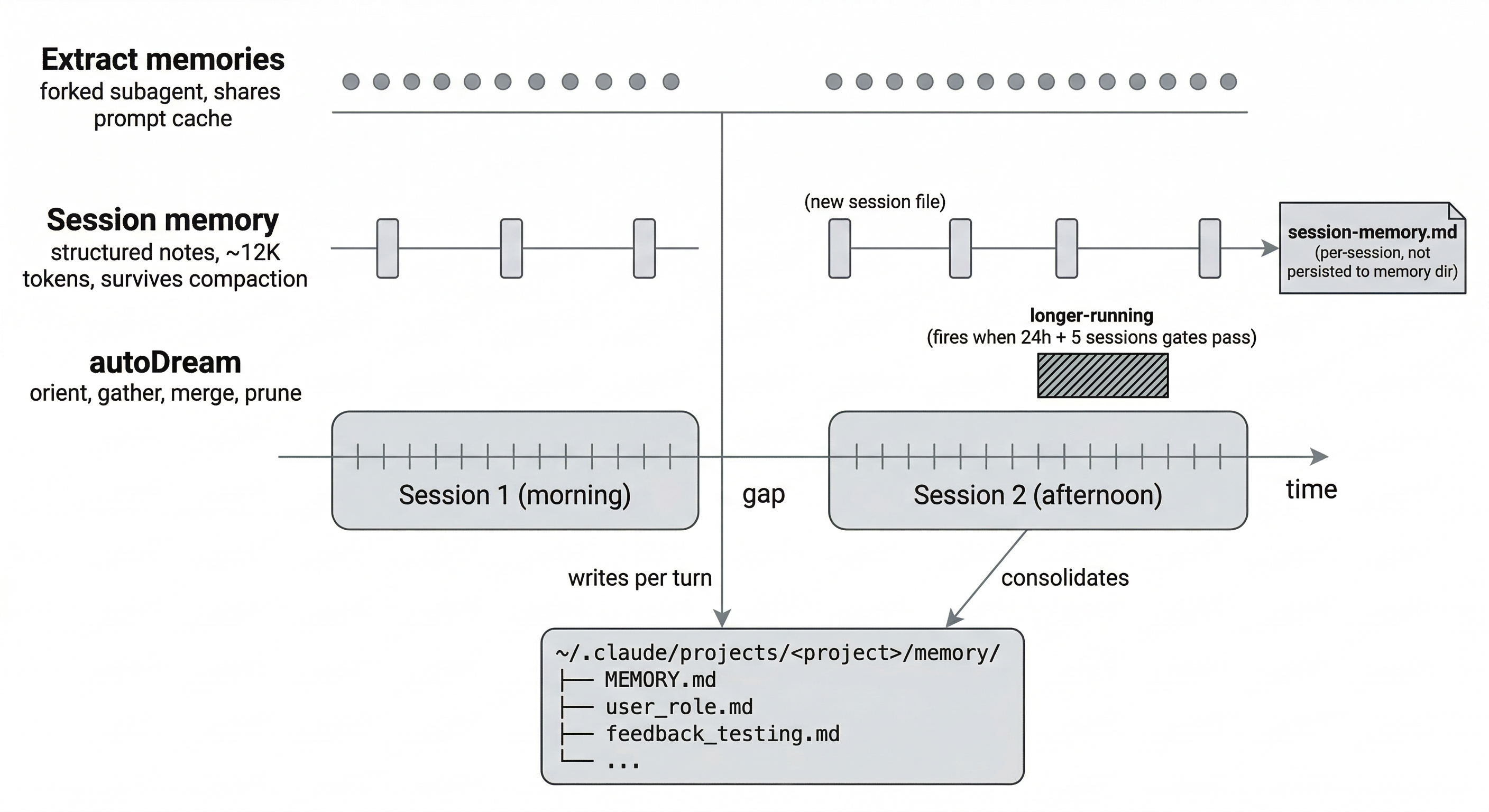
Auto memory isn't just "Claude notices something and writes it down." Three separate background processes extract information at different timescales, and the source code for each one tells a different story about what Anthropic thinks matters.
Per-turn: extract memories
After each complete query loop (when the model produces a final response with no tool calls), a forked subagent runs in the background. It shares the parent conversation's prompt cache, so it's cheap. It scans existing memory files, reviews what happened this turn, and writes new memories or updates existing ones.
The forked agent has restricted tool access: Read, Grep, and Glob work unrestricted. Write and Edit only work for paths inside the memory directory. It can't run arbitrary shell commands or modify project files.
If Claude's main agent already wrote to auto memory during the turn (because you explicitly asked it to remember something), the extraction step skips that range to avoid duplicates.
Per-session: session memory
A separate system from auto memory entirely. Session memory maintains structured notes about the current conversation, not for future sessions but for surviving compaction within the current one.
It fires when three conditions are met:
- Total context has reached at least 10,000 tokens
- Context has grown by at least 5,000 tokens since the last extraction
- At least 3 tool calls have happened since the last extraction
A forked subagent updates a structured template with sections like "Current State", "Files and Functions", "Errors & Corrections", and "Worklog". Each section is capped at ~2,000 tokens, ~12,000 total. The template can be customized at ~/.claude/session-memory/config/template.md.
This is what makes compaction smarter. Instead of re-summarizing the full conversation from scratch, auto-compact can reuse the session memory notes that were already extracted incrementally.
Overnight: autoDream
When enough time passes and enough sessions accumulate, Claude consolidates memories. Three gates, checked in cost order:
- At least 24 hours since the last consolidation
- At least 5 sessions modified since the last consolidation
- A file lock (
.consolidate-lock) isn't held by another process
When all three pass, a forked subagent runs a four-phase consolidation. First it reads the MEMORY.md index and skims existing topic files to orient itself. Then it searches daily logs and transcripts for new learnings. It writes or updates topic files, merges new signal into existing ones, and converts relative dates to absolute ones. Finally it prunes the MEMORY.md index back under 200 lines, removes stale pointers, and resolves contradictions between old and new facts.
The naming is intentional. The code calls this "dreaming." A DreamTask UI wrapper shows progress in the footer when it's running. If you kill it, the lock's modification time rolls back so the next session can retry.
This runs at the end of a turn when the gates pass. It doesn't require your machine to be idle or your session to be closed, despite what some descriptions suggest. It's just infrequent because the 24-hour and 5-session gates filter most turns.
What survives compaction
When Claude compacts a long conversation (automatically or via /compact), both CLAUDE.md files and auto memory survive. They're read from disk, not from conversation history. The compaction cleanup code explicitly invalidates the memory cache and forces a fresh system prompt rebuild:
getUserContext.cache.clear()
resetGetMemoryFilesCache('compact')
clearSystemPromptSections()
Session memory also survives because it's written to a file, not stored in conversation context. After compaction, auto-compact can reuse the session memory file instead of re-summarizing, which produces better results since the notes were extracted incrementally while context was full.
What doesn't survive: instructions given only in conversation that weren't saved to either system. If you told Claude something important mid-session and it didn't write it to memory, it's gone after compaction.
Team memory sync
Behind a feature flag (TEAMMEM), Claude Code can sync memory files between team members through a centralized server, scoped per GitHub repository.
The sync is bidirectional with server-wins conflict resolution. Uploads are delta-based: only entries whose SHA-256 checksum changed get pushed. A secret scanner runs before upload to catch API keys. There's a 2-second debounce on local file changes before pushing, a 250KB per-entry limit, and a 200KB per-PUT-request limit.
Deletions don't propagate. If you delete a local team memory file, the next pull restores it from the server. To actually remove a shared memory, you'd need to delete it server-side.
This feature requires first-party OAuth with GitHub access. It's not available to everyone yet.
The gaps
These systems cover a lot of ground. But structural limitations remain.
Auto memory is per-repository. Preferences you've taught Claude in one project don't carry over to another. The user-level ~/.claude/CLAUDE.md handles some of this, but it's static. You write it manually and Claude can't update it during a session.
Auto memory is machine-local. The sanitized project path changes when the username or mount point differs. Same project, different machine, different memory directory. CLAUDE.md files sync via git, but auto memory doesn't (unless you're on team sync, which is feature-gated).
Memory recall depends on one-line descriptions in MEMORY.md and Sonnet's ability to pick the right 5 files. There's no vector search, no semantic index. If the description doesn't match the query well, the memory won't surface even if it's relevant.
There's no fact versioning. When Claude learns something new that contradicts an older note, both sit side by side. The staleness warning for files older than one day helps, but there's no way to retire an old fact while preserving it for reference.
Session memory doesn't persist across sessions. It's designed for compaction survival, not cross-session continuity. If you're doing a multi-day task, each session starts fresh on the session memory side. Auto memory and autoDream partially fill this gap, but they're lossy. There's no way to checkpoint exactly where you left off.
Filling the gaps with db0
db0 is an MCP server that adds the missing layers on top of Claude Code's built-in memory. It gives you a user scope for preferences that follow you across projects, fact superseding so old knowledge gets retired instead of accumulating, semantic search across all your memories, cross-device sync via Postgres, and state checkpoints for multi-session tasks.
It doesn't replace CLAUDE.md or auto memory. It covers what they can't.
claude mcp add --scope user --transport stdio db0 -- npx -y @db0-ai/claude-code